Every YouTube line, twice: how it's said, and what it means.

A Chrome extension that puts your translation under the original subtitle, in sync, on any video with captions. No pausing to look things up.

Add to Chrome Free. No account.

What the player shows: the original on top, Spanish underneath.

Nothing to learn. Install, pick, play.

01

Install it from the Chrome Web Store

It only runs on youtube.com and asks for nothing else.

02

Choose the language you want underneath

Over 80 to pick from. It is the one setting you have to touch.

03

Open a video that has captions

Captions switch on by themselves. Normal and automatic ones both work. A video with no captions has nothing to translate, and the popup says so.

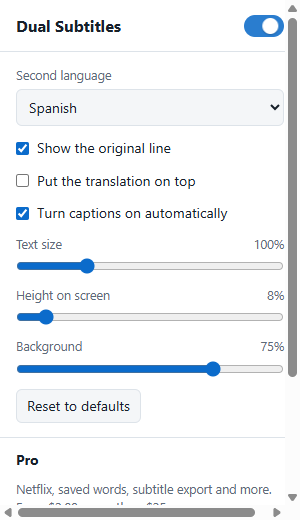
Change it while the video plays

Too big, too low, too busy? Move the sliders and watch the subtitles change. Put the translation above or below the original, or hide the original once you stop needing it.

It runs only on youtube.com and keeps your settings in your own browser. There is no account and nothing is sent to us.

For when watching is not enough: keep the words

Everything above stays free. Pro adds two tools, for people who study from what they watch. See what it costs.

Click a word, keep it

Click any word in a subtitle and it goes into your list with the sentence it came from and its translation. Export the list as CSV, or as a file Anki can import.

wordcontexttranslation
summitWe left before sunrise to reach the summit.cumbre
sunriseWe left before sunrise to reach the summit.amanecer

Example rows.

Take the subtitles with you

Download the video's subtitles as an SRT file: both languages, only the original, or only the translation. Read them offline, or paste them into your notes.

1
00:00:01,200 --> 00:00:04,100
We left before sunrise to reach the summit.
Salimos antes del amanecer para llegar a la cumbre.

Example of the file format.

Questions

Does it work on every video?

On every video that has captions, normal or automatic. No captions, nothing to translate.

Is the free version limited?

No trial, no timer. Dual subtitles and every display setting are free for good. Pro only adds saved words and subtitle export.

What do you collect?

Nothing. Settings live in your browser. Read the privacy policy.

What if YouTube changes something and it breaks?

The popup tells you when YouTube does not return a translation. I fix it and ship an update through the Chrome Web Store. Tell me if you see it.